Chapter Objectives
1. How to Assign a Non-Manageable Public IP with Port Forwarding
Assign a Non-Manageable Public IP to Clients
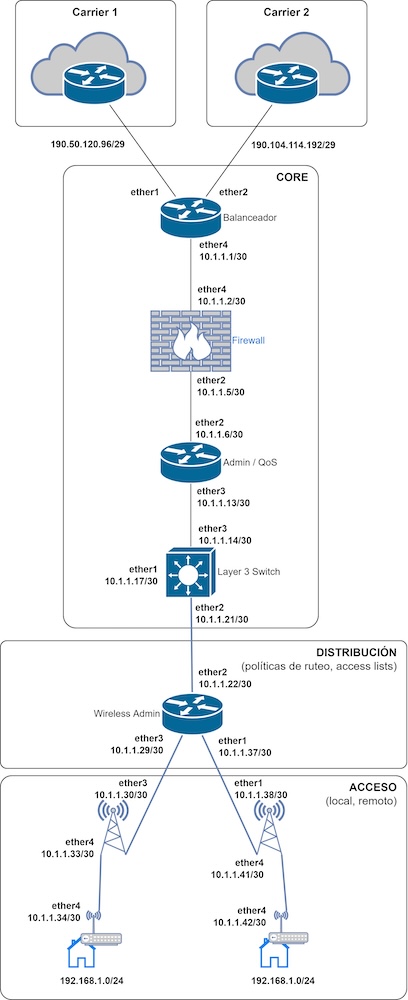
You will learn how to assign a non-manageable public IP to a client using NAT. This allows the client to access their edge router and have all their network traffic masked through this public IP, simplifying network management.
NAT Configuration and Effective Use on the Edge Router
You will understand the need to correctly configure the public IPs provided by the internet providers and the NAT rules on the edge router. This includes the use of 1-to-1 NAT to link each public IP with a specific private IP, ensuring an efficient and unique correspondence between them.
Implementation of Masquerading and External Access Rules
You will learn how to configure two types of rules on the router: one for masquerading the client’s network (using the srcnat Chain) and another to allow external access to the public IP assigned to the client (using the dstnat Chain), highlighting the importance of the correct placement of these rules in the router’s configuration.
Enabling Both Internal and External Network Access
You will study how to configure an additional Hairpin NAT rule to allow access to the client’s network from both inside and outside using the same public IP. This ensures that traffic destined for a public IP from the client’s private network is properly redirected, facilitating seamless and unrestricted access.
2. How to Assign a Non-Manageable Public IP through NAT
Assignment of Non-Manageable Public IP for Remote Access
The main objective is to teach how to assign a non-manageable public IP to a client to enable remote access to their router. This is crucial for residential clients who need to connect to their network from external locations.
NAT Configuration on the Edge Router
The video aims to explain the Network Address Translation (NAT) configuration on the edge router, using the public IP addresses provided by the internet providers. This step is essential for managing network traffic and enabling efficient remote access.
Implementation of Port Forwarding for Specific Traffic Direction
A key objective is to detail the process of configuring Port Forwarding on the router. This technique is important for directing internet traffic to specific devices within a private network, using the TCP protocol and specific ports for remote access.
Enabling Internal and External Access through Hairpin NAT
The video aims to demonstrate how to implement an additional NAT rule, known as Hairpin NAT, to allow access to the public IP from both inside and outside the client’s private network. This aspect is fundamental to ensuring seamless and unrestricted access to the client’s network through the assigned public IP.
3. How to Assign Manageable (Routable) Public IP Addresses to a Client
Need for Manageable Public IP Addresses
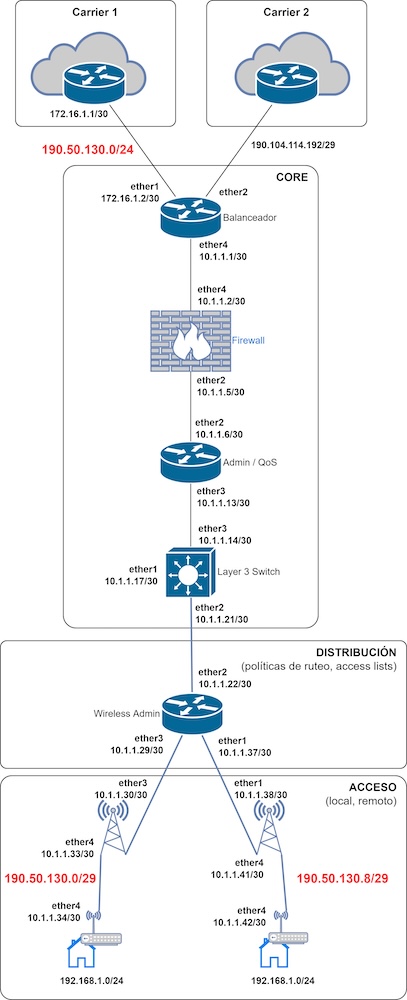
The demand from ISP customers for manageable or routable public IP addresses is highlighted, allowing them to configure their own networks and assign public addresses to their users.
ISP Network Preparation and Configuration
The necessary preparation, such as receiving a segment of public IP addresses from the provider and configuring these addresses within the ISP’s network, is detailed. The importance of proper subnetting of the public IP address segment is emphasized, such as dividing a /24 segment into /28 or /29 subnets depending on the clients’ needs.
Configuration of Routes and NAT on ISP Routers
The video guides through routing configuration across the ISP network, including static route configuration and NAT adjustments on the edge router and other devices. It shows how to configure routes so that traffic from certain IP segments passes specifically through a determined internet provider and how to prevent these segments from being masked.
Implementation in the Client’s Network
Finally, it describes how to implement these changes in the client’s network, including configuring the public IP addresses on the client’s devices and adjusting the NAT rules to enable effective use of the public IP addresses. Tests are performed to confirm that clients can access and be accessed through their newly assigned public IP addresses.