



Self Paced Training
Welcome to MikroLABs
At MikroLabs, we are dedicated to transforming the way you learn about networks and information technologies.
Learn at your own pace!


WHAT WE DO
What you will find in MikroLABs
This innovative section is your one-stop destination for intensive and highly specialized tutorials on network configurations for various scenarios.






Complementary Resources
In addition to the videos, we will provide you with essential tools for your learning:
Configuration Commands in CLI:
You will gain access to MikroTik configuration commands in CLI format, ready to be copied and deployed directly to your devices.
Laboratory Logic Diagrams:
Each setup video is complemented by a logic diagram of the corresponding lab, making it easier for you to understand and practice.
Tutorials available at MikroLABs
IPv4 protocol
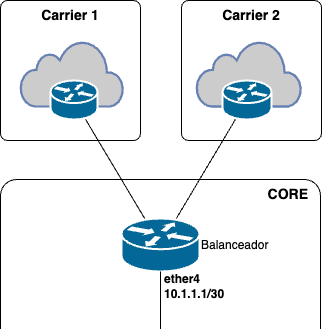
Specialized Tutorials in Edge Router and Internetworking
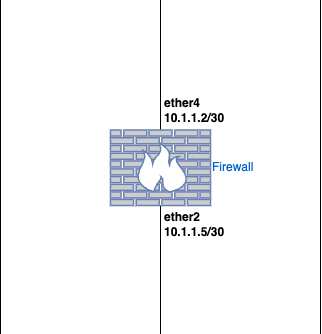
Specialized in Firewall and Security

Administration and Quality of Service
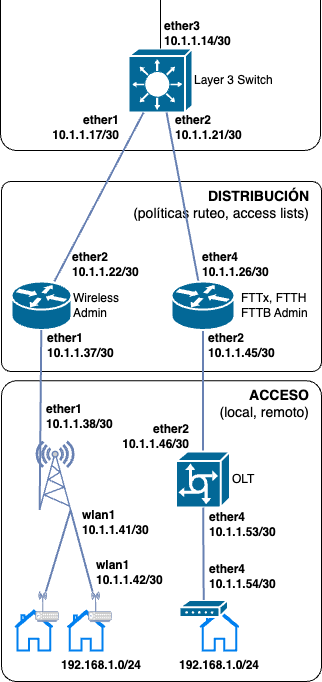
Specialized in Internal Network
Specialized in Tunnels (VPN)
Specialized in Basic Concepts
Tutorials in IPv6 Protocol
IPv6 protocol
Specialized Tutorials in Edge Router and Internetworking
Specialized in Firewall and Security
Administration and Quality of Service
Specialized in Internal Network
Specialized in Tunnels (VPN)
Specialized in Basic Concepts
Tutorials available at MikroLABs
Tutorials in IPv4 Protocol
Specialized in Edge Router and Internetworking
Specialized in Firewall and Security
Specialized in Internal Network
Specialized in Basic Concepts
Specialized in Tunnels (VPN)
Tutorials in IPv6 Protocol
Specialized in Edge Router and Internetworking
Specialized in Firewall and Security
Specialized in Internal Network
Specialized in Tunnels (VPN)
Specialized in Basic Concepts
You choose
Learn at your own pace
At MikroLabs, we understand that each student has their own learning pace. That’s why all of our resources are available 24/7, allowing you to learn and practice when it’s most convenient for you.
- Personalized Learning
- Stress Reduction
- Continuous Accessibility to Resources


WISP - Corporate - Campus
Specialized tutorials
MikroLabs is a section where you will find short video tutorials in which configurations of specific scenarios for ISP/WISP, corporate, SME, university campus, and residential networks will be explained in extensive detail.
The MikroLabs tutorial videos will be especially focused on MikroTik, Ubiquiti and Cambium Networks equipment configurations.
Configuration commands
Apply immediately
In addition to the step-by-step explanatory videos, the student will find the MikroTik configuration commands in CLI (command line interface) format, which they can copy and implement immediately on their devices.
You will also have the lab logic diagram for each setup video.
					/interface ethernet
set [ find default-name=ether3 ] name=ether1
set [ find default-name=ether1 ] name=ether2
set [ find default-name=ether2 ] name=ether3

/interface wireless security-profiles
set [ find default=yes ] supplicant-identity=MikroTik

/port
set 0 name=serial0

/tool romon
set enabled=yes

/ip address
add address=190.50.120.98/29 comment="WAN 1" interface=ether1 network=190.50.120.96
add address=190.50.120.99/29 interface=ether1 network=190.50.120.96
add address=190.50.120.100/29 interface=ether1 network=190.50.120.96
add address=190.50.120.101/29 interface=ether1 network=190.50.120.96
add address=190.50.120.102/29 interface=ether1 network=190.50.120.96
add address=190.104.114.194/29 comment="WAN 2" interface=ether2 network=190.104.114.192
add address=190.104.114.195/29 interface=ether2 network=190.104.114.192
add address=190.104.114.196/29 interface=ether2 network=190.104.114.192
add address=190.104.114.197/29 interface=ether2 network=190.104.114.192
add address=190.104.114.198/29 interface=ether2 network=190.104.114.192
add address=192.168.1.1/24 comment=LAN1 interface=ether3 network=192.168.1.0
add address=192.168.2.1/24 comment=LAN2 interface=ether4 network=192.168.2.0

/ip firewall nat
add action=src-nat chain=srcnat out-interface=ether1 to-addresses=190.50.120.98-190.50.120.102
add action=src-nat chain=srcnat out-interface=ether2 to-addresses=190.104.114.194-190.104.114.198

/ip route
add disabled=no dst-address=0.0.0.0/0 gateway=190.50.120.97 routing-table=main suppress-hw-offload=no
add disabled=no dst-address=0.0.0.0/0 gateway=190.104.114.193 routing-table=main suppress-hw-offload=no