

Certificaciones MikroTik (Guatemala)

MTCNA: 8-9-10 de Septiembre (regístro)

MTCTCE: 11-12 de Septiembre (regístro)

Certificaciones MikroTik (El Salvador)

MTCNA: 8-9-10 de Septiembre (regístro)

MTCTCE: 11-12 de Septiembre (regístro)

How to properly manage multiple public or private IP addresses on the edge router

Improve your Networking Skills with Our Specialized Tutorial
Elevate your understanding and practice in managing multiple IP addresses. From single ISP setups to complex multi-provider scenarios, this tutorial prepares you for any challenge.
Sign up and transform your career into networks!
Facebook
Twitter
LinkedIn
WhatsApp
Telegram

Content and access to the Tutorial

Estado actual

No Inscrito

Precio

8.99 USD

Primeros pasos

Contenido del Curso

Rate this tutorial (MLE-001)

This tutorial includes

What you need to access this tutorial

What the student will learn

By completing this tutorial, students will be able to:

Requirements

General Objective

This tutorial is designed to provide students with a deep understanding and practical skills in managing multiple IP addresses, both public and private, in an edge router environment.

It aims to equip participants with the knowledge and tools necessary to efficiently configure Internet access in various scenarios, using both static and dynamic IPs, and addressing configurations with one or multiple Internet Service Providers (ISPs).

Chapter Objectives

1. Configuration of Internet Access via Static Private IP and Dynamic Private IP

      • Understand the difference between static and dynamic private IP addresses.
      • Learn how to configure Internet access using private IP addresses assigned by the ISP.

2. Configuration of Internet Access via Static Public IP and Dynamic Public IP

      • Understand how to manage static and dynamic public IPs for Internet access.
      • Develop skills to configure Internet connections with public IPs provided by the ISP.

3. Configuration of Internet Access via Multiple Public IP Addresses through a Single Provider (ISP)

      • Learn how to handle multiple public IP addresses with a single ISP.
      • Master techniques to optimize the use of multiple public IPs in a network environment.

4. Configuration of Internet Access via Multiple Public IP Addresses with Two Providers (ISPs)

      • Acquire skills to manage Internet access using public IPs from two different ISPs.
      • Understand how to balance and manage multiple Internet connections.

5. Configuration of Internet Access with Two Providers: One for Public IPs and Another for Private IPs

      • Learn how to configure Internet access combining providers of public and private IPs.
      • Develop strategies for efficient network resource management in mixed IP scenarios.

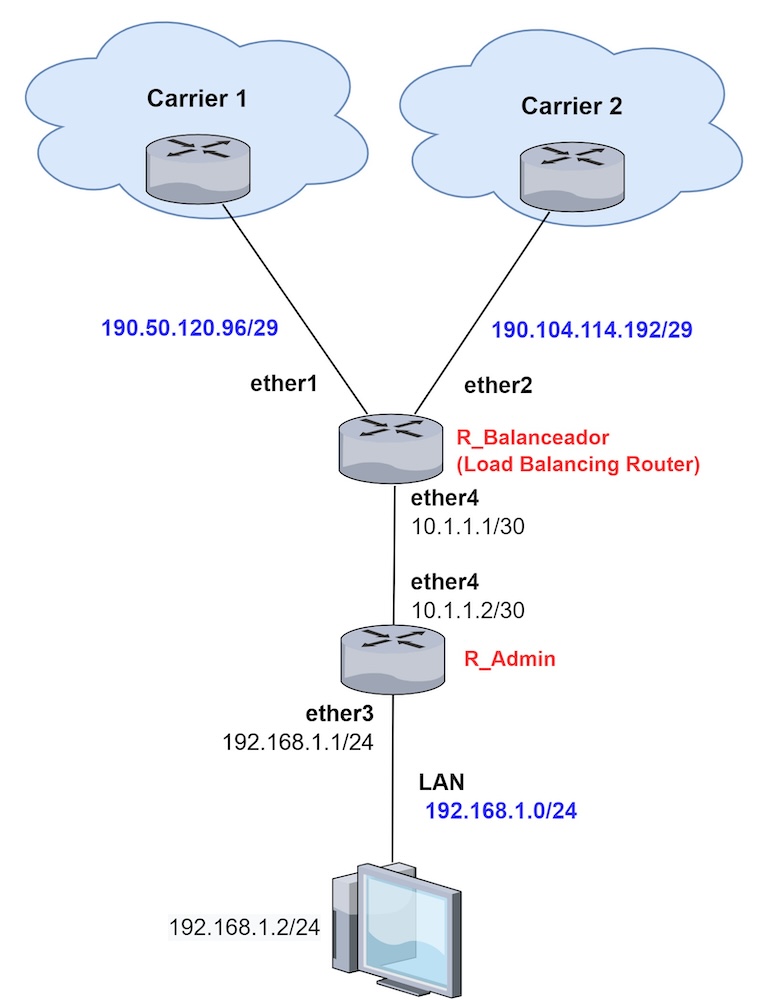
6. Configuration of Public IPs with a Load Balancing Router and Management Router

      • Understand the configuration of public IPs in an environment with a load balancing router and a management router.
      • Acquire advanced knowledge in managing and optimizing networks with multiple routers.
 

Do you need more info?

We invite you to leave us your information to answer your questions.
Interés cursos MikroLabs Ingles

Related products that may interest you

1
Haz clic para chatear

AcademyXperts BETA 1.0

Tu asistente virtual de AcademyXperts

Cuéntanos un poco sobre tí.

Así podremos darte la mejor recomendación

El teléfono no es válido

Confírmanos tus datos

Nuestros horarios son de Lunes a Viernes de 9:00 AM a 6:00 PM.

Atención: Lunes a Viernes de 9:00 AM a 6:00 PM (Ecuador GMT-5).