

What the student will learn
By completing this tutorial, students will be able to:
- Efficiently configure and manage Internet outlets in various scenarios using private and public IPs.
- Understand the differences and practical applications of static and dynamic IPs.
- Apply the knowledge acquired in real work environments, improving the efficiency and security of business networks.
- Implement effective strategies for network management in environments with balancing and administration routers.
- Troubleshoot common issues related to configuring and managing IP addresses on edge routers.
- Manage multiple Internet connections with one or more ISPs.
Requirements
- Understand basic networking concepts, such as network types (LAN, WAN), network topologies, and OSI/TCP-IP models.
- Know the differences between public and private IP addresses, and how they are used in networks.
- Have knowledge of subnets, netmasks and IP addressing.
- Understand the basic concepts of routing and switching in networks.
- Know how Dynamic Host Configuration Protocol (DHCP) and Domain Name System (DNS) work.
- Understand the assignment of dynamic and static IPs.
General Objective
This tutorial is designed to provide students with a deep understanding and practical skills in managing multiple IP addresses, both public and private, in an edge router environment.
It aims to equip participants with the knowledge and tools necessary to efficiently configure Internet access in various scenarios, using both static and dynamic IPs, and addressing configurations with one or multiple Internet Service Providers (ISPs).
Chapter Objectives
1. Configuration of Internet Access via Static Private IP and Dynamic Private IP
- Understand the difference between static and dynamic private IP addresses.
- Learn how to configure Internet access using private IP addresses assigned by the ISP.
2. Configuration of Internet Access via Static Public IP and Dynamic Public IP
- Understand how to manage static and dynamic public IPs for Internet access.
- Develop skills to configure Internet connections with public IPs provided by the ISP.
3. Configuration of Internet Access via Multiple Public IP Addresses through a Single Provider (ISP)
- Learn how to handle multiple public IP addresses with a single ISP.
- Master techniques to optimize the use of multiple public IPs in a network environment.
4. Configuration of Internet Access via Multiple Public IP Addresses with Two Providers (ISPs)
- Acquire skills to manage Internet access using public IPs from two different ISPs.
- Understand how to balance and manage multiple Internet connections.
5. Configuration of Internet Access with Two Providers: One for Public IPs and Another for Private IPs
- Learn how to configure Internet access combining providers of public and private IPs.
- Develop strategies for efficient network resource management in mixed IP scenarios.
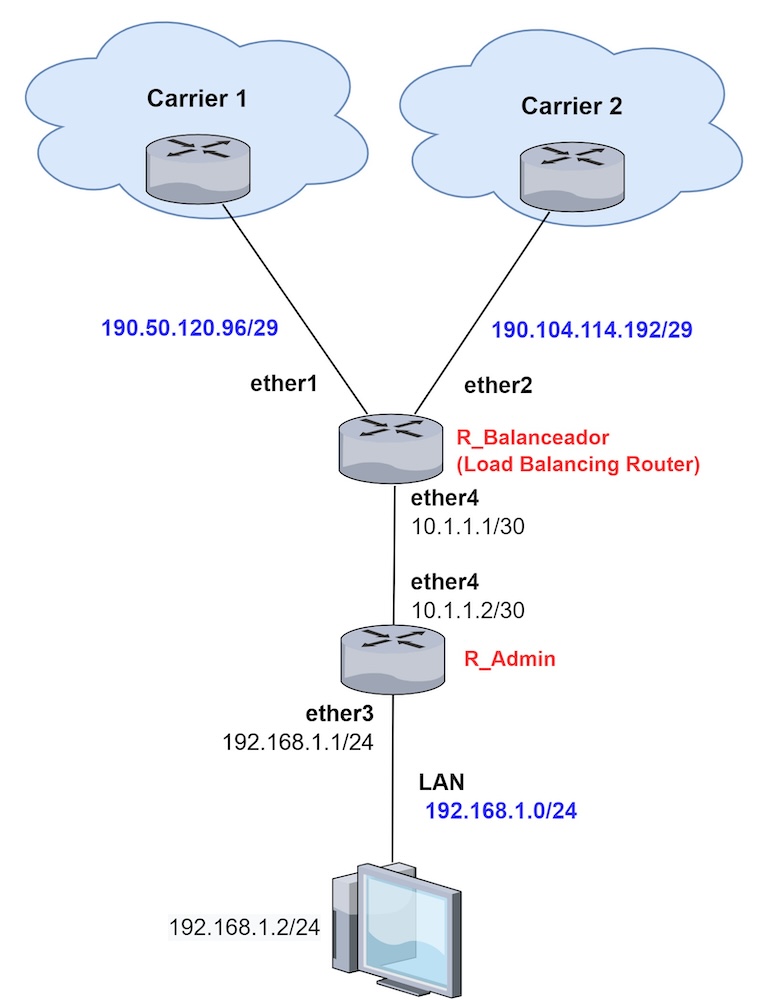
6. Configuration of Public IPs with a Load Balancing Router and Management Router
- Understand the configuration of public IPs in an environment with a load balancing router and a management router.
- Acquire advanced knowledge in managing and optimizing networks with multiple routers.
-
in RouterOS version 7
$8,99
Do you need more info?
We invite you to leave us your information to answer your questions.
Get this Tutorial
(MLE-001) How to properly manage multiple public or private IP addresses on the edge router
in RouterOS version 7
$8,99

De nuestro Blog ...
¿Qué es SwitchOS (SwOS) y para qué sirve en switches MikroTik?
febrero 24, 2026
Métrica de red: qué es y cómo se usa en el enrutamiento
febrero 18, 2026
Cómo crear un Túnel 6to4 en MikroTik RouterOS
enero 11, 2026